Soil Moisture Sensor

Real-time soil moisture monitoring for your garden

Installation

Soildrops Soil Moisture Sensor Installation Tutorial

Estimated installation Time: 3 mins each sensor

The sensor transmits to the controller over a range of about 100 feet. Walls, concrete, metal and dense vegetation between the sensor and the controller shorten that, so place sensors as close to the controller as the zone layout allows.

A solar-powered booster that extends this to over half a mile is launching in late 2026. It needs no pairing and no wiring — it picks up your sensors automatically and relays them to the controller. The earlier battery-powered booster has been discontinued.

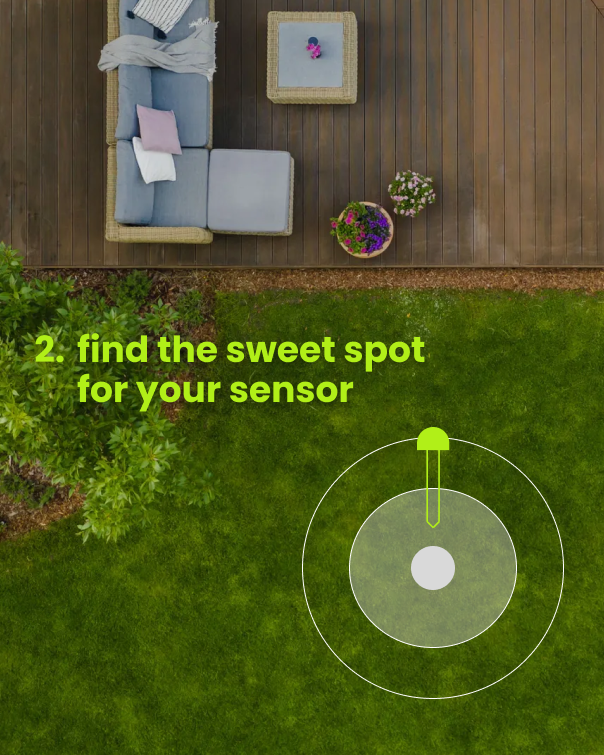
Step 1: Place Your Sensor

Sprinkler Zones: Place in the center of the zone.

Dripline Zones: Place under a drip hole at the midpoint for accurate readings.


Pro Tips:

  • Place near the controller for the strongest signal.

  • Avoid having concrete or metal doors between the controller and sensor.

  • Do not place the sensor next to footings, concrete, rocks, or bricks.

  • Position the sensor at the highest point in the area whenever possible.
SetUp1-1.png

Step 2: Moisten Soil

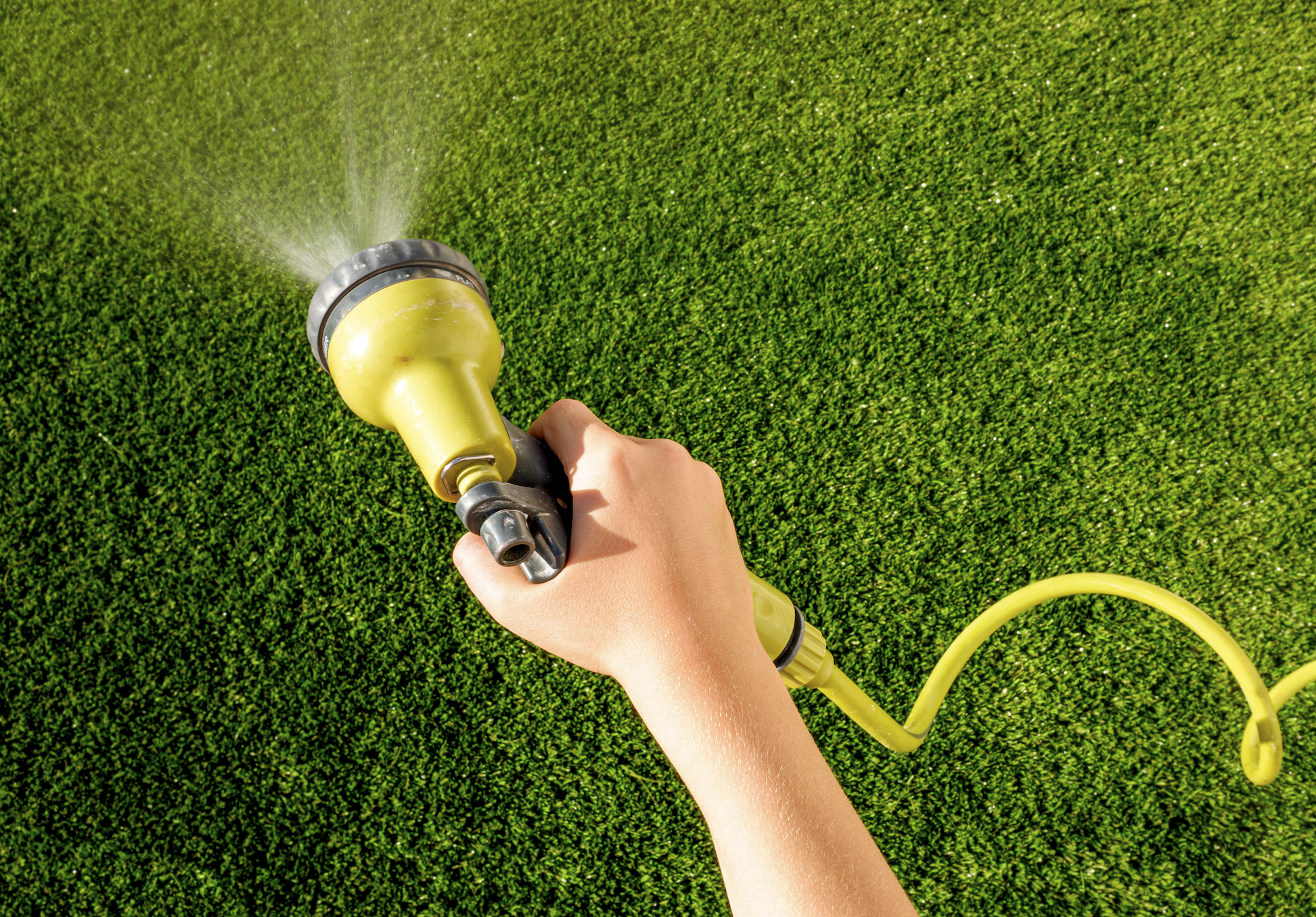
  1. Avoid damage by inserting into moist soil.
  2. Water the area manually or, use QuickRun (3-5 min) in the app.
Screenshot 2025-03-08 at 4.55.38 PM.png

Step 3: Pair Your Sensor

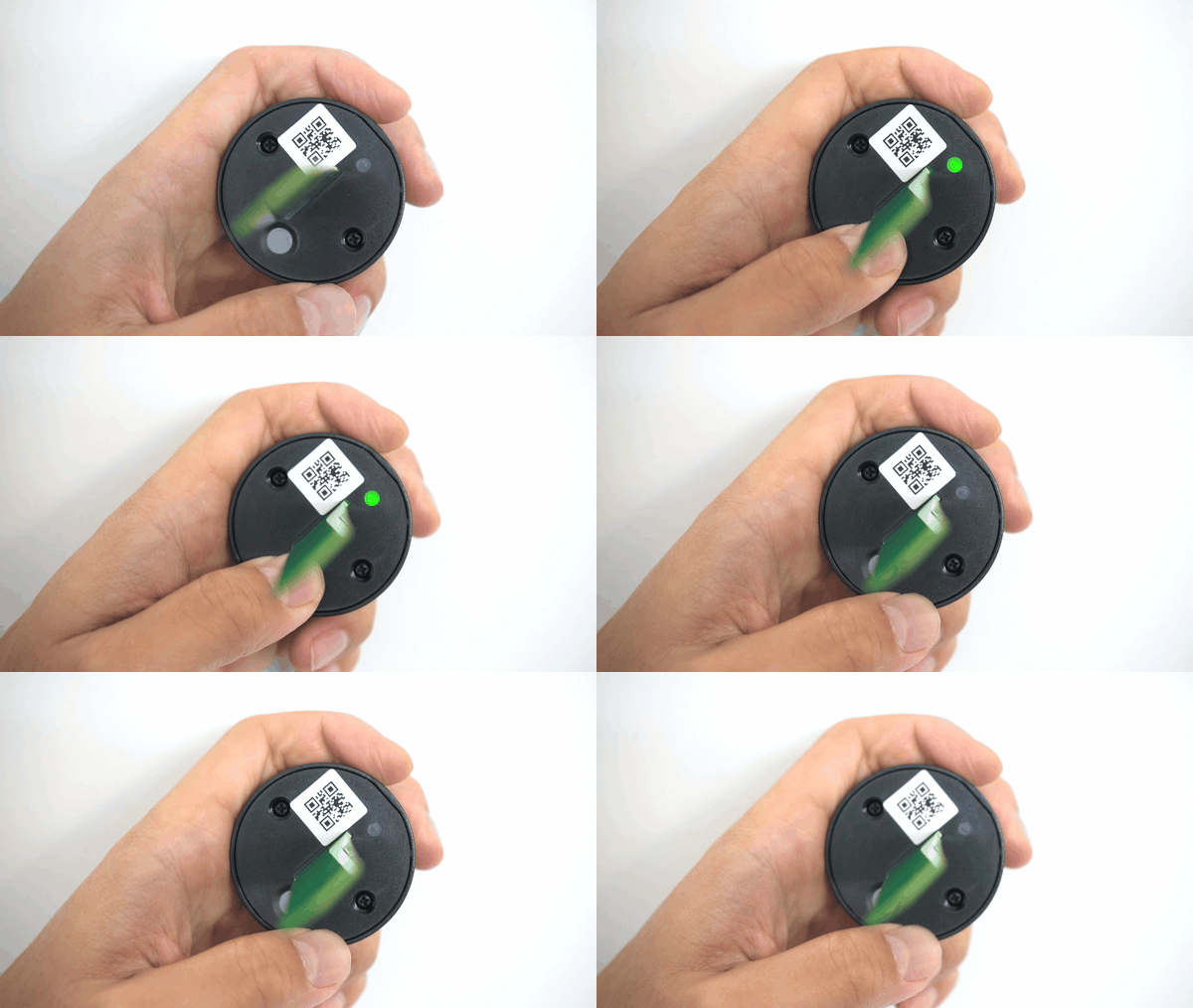
  1. Near controller, hold button (5s) until LED blinks.
  2. In the app, tap 'Add Sensor' and scan the QR code.
  3. Wait for pairing confirmation.

sensor_pairing.gif

Step 4: Sensor Insertion

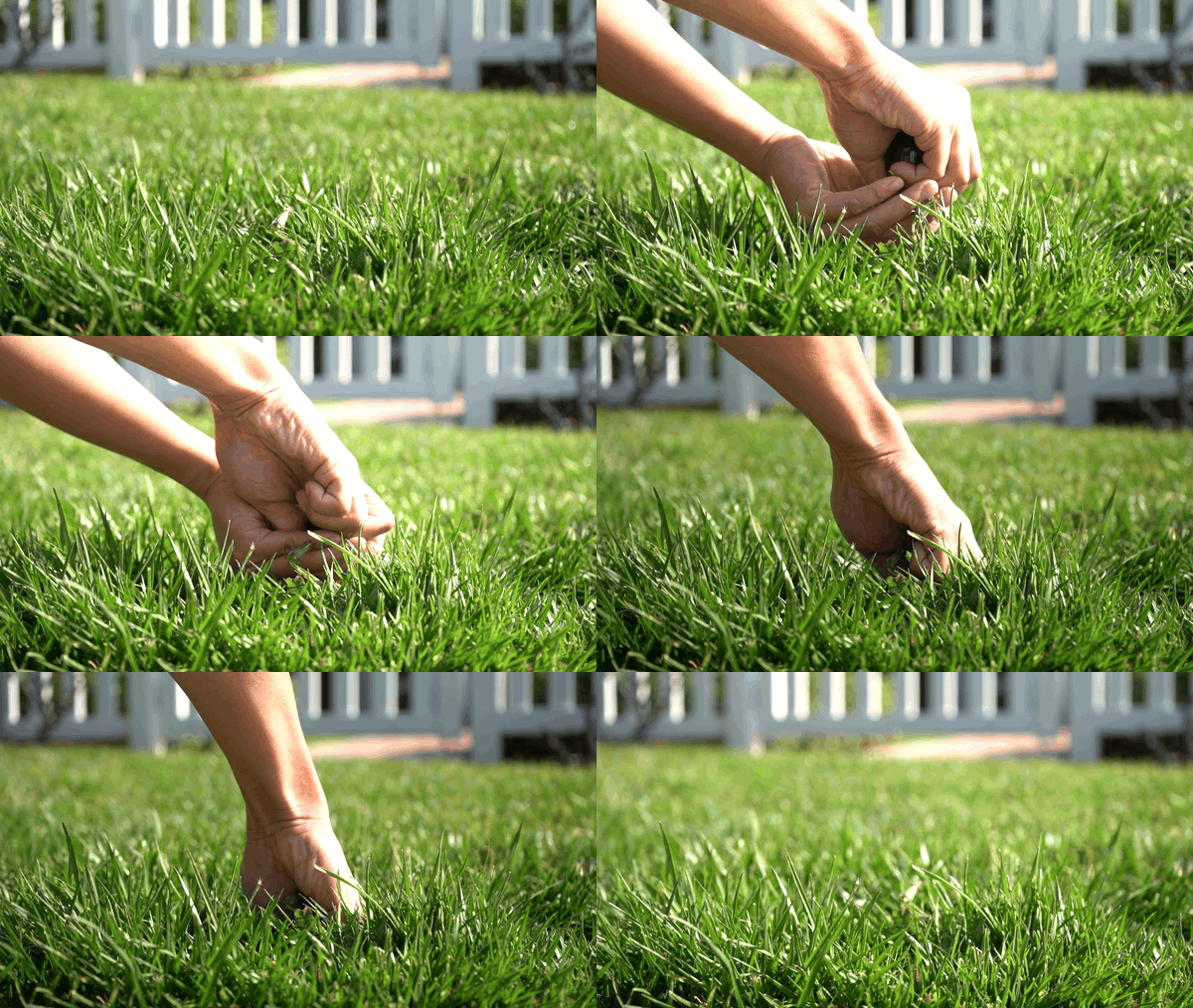
  1. Gently push sensor into soil. Stop and move if you feel resistance.
  2. Push sensor down until top is flush with soil. 
sensor_insertion.gif

Step 5: Wait for Data

  1. Initial 0% moisture is normal – don't worry! You’ll recieve an accurate reading within 10 minutes.Congratulations, your sensor is now monitoring soil moisture.
  2. If no data appears after 10 minutes, try moving the sensor to a different spot for a better signal.

Pairing a Soil Moisture Sensor

Soil moisture sensors give your Soildrops system real-time data about how wet the soil actually is — not an estimate, but a measurement. This unlocks Autopilot mode, where the AI makes watering decisions based on what's happening underground.

Do You Need a Sensor?

Not necessarily. Soildrops works without sensors in Smart or Manual mode. But adding a sensor gives you:

  • Autopilot mode: Fully AI-driven watering based on actual soil conditions.
  • More accurate watering: The system knows exactly when your soil needs water.
  • Maximum water savings: No overwatering, no guessing, no wasting water after rain.

Pairing During Initial Setup

If you selected "Controller + Sensors" during setup, the app walks you through pairing a sensor to each zone. Follow the on-screen instructions below.

Adding a Sensor Later

Important: The sensor only stays in pairing mode for 30 seconds, and pairing mode drains the battery. Get everything ready in the app before pressing the sensor button.
  1. Go to System Overview in the app.
  2. Find the zone card where you want to add a sensor.
  3. Tap "Add Sensor To This Zone."
  4. When you see the QR code scanner screen, get your sensor and phone ready — but don't press the sensor button yet.
  5. Now press and hold the button on the sensor for 5 seconds to enter pairing mode. The LED will start blinking.
  6. Immediately scan the QR code on the sensor using your phone's camera.
  7. The sensor pairs automatically — you'll see a confirmation when it's connected.
Tip: If the 30-second window expires before pairing completes, just press and hold the button for 5 seconds again to re-enter pairing mode.

What You'll See on Your Zone Card

  • Battery %: Typically lasts 1–2 years.
  • Signal strength: Green (strong), yellow (fair), or red (weak).
  • Current moisture reading: Real-time data from the soil.
Replacing a sensor: If a sensor dies or malfunctions, tap "Replace" on the zone detail screen and scan the new sensor's QR code. The new one takes over immediately.

How long does installation take?

Controller: About 10–15 minutes for most setups — mount it, connect your irrigation wires, scan the QR code, and connect to Wi-Fi. The app walks you through every step.

Sensor: About 3 minutes per sensor — insert in the ground at root level and pair via QR code. Quick and simple.

Where should I place the sensor?

Place the sensor in a representative spot within the zone — somewhere that reflects the typical soil and moisture conditions for that area. Avoid edges, dry spots near pavement, or soggy spots near downspouts. The goal is to get a reading that accurately represents the whole zone.

Push the sensor into the soil at root level for your primary plants (usually 3–4 inches for lawns, deeper for shrubs and trees). Make sure the sensor tip is in full contact with the soil, not sitting in an air pocket.

Tip: If you're not sure where to put it, place it about 1/3 of the way from the nearest sprinkler head. This tends to represent average moisture conditions for the zone.

Usage & Care

Sensor Health and Management

Keep an eye on your sensors to make sure they're reporting accurately and staying connected.

Checking Sensor Status

Each zone card in the app shows the sensor's battery level and signal strength. Green is good, yellow means it's getting weak, red means action is needed.

Signal Strength Tips

  • The sensor communicates with the controller over a range of about 100 feet. Concrete, metal and dense vegetation in the path shorten it.
  • If signal is weak, try repositioning the sensor closer to the controller, or move the controller's antenna to face the sensor.

Battery Life

Sensor batteries typically last 1–2 years. When the battery indicator shows low, plan to replace it within the next couple of weeks. Sensors use a CR2477 3V coin cell, which is widely available online and easy to swap.

Maintenance habit: Check sensor status in the app at the start of each watering season. A quick glance at battery and signal levels prevents surprises mid-summer.

Delete Sensor & Replace Sensor

If a sensor needs replacing — dead battery, damage, or you're reorganizing zones — here's how to handle it.

Replacing a Sensor

  1. Open the zone detail view for the zone with the sensor you're replacing.
  2. Tap "Replace Sensor."
  3. Scan the QR code on the new sensor.
  4. The new sensor takes over immediately — no reconfiguration needed.

Deleting a Sensor

  1. Open the zone detail view.
  2. Tap the sensor settings.
  3. Tap "Delete Sensor."

Removing a sensor means that zone can no longer use Autopilot mode — it will switch to Smart or Manual mode.

Keep your QR codes: Each sensor has a unique 8-digit ID on its QR label. Store these somewhere safe — you'll need the code if you ever re-pair or replace the sensor.

Replacing the Sensor Battery

Sensors run on a single Panasonic CR2477 3V coin cell — widely available online — and a battery typically lasts 1.5–2 years. The app shows a yellow battery indicator when it is getting low and red when it is time to replace it.

How to replace it

  1. Pull the sensor out of the soil and open the enclosure.
  2. Remove the old coin cell and seat the new CR2477 the same way, making sure it sits firmly in the clip.
  3. Press the button and check that the LED lights — do this indoors or in shade, it is hard to see in sunlight.
  4. Close the enclosure and put the sensor back in the soil.

The whole swap takes a minute or two. Here is a short video walkthrough: battery replacement video.

No re-pairing needed. A sensor that was already paired keeps its pairing through a battery swap. Only a sensor that has never been paired needs pairing after the new battery goes in.
Brand-new sensor with a dead battery out of the box? That should not happen — email support@soildrops.com and we will send you fresh batteries free of charge.

Troubleshooting

Troubleshooting Sensor Issues

If your sensor isn't reporting data, shows inaccurate readings, or appears offline in the app, work through these checks.

Sensor Not Reporting / Offline

  1. Check the battery. A dead or low battery is the most common cause. Replace it and see if readings resume.
  2. Check signal strength. If the sensor is too far from the controller (or there's heavy obstruction), the signal may not reach. Try moving the sensor closer or repositioning the controller's antenna.
  3. Reseat the sensor. Pull it out of the ground, wipe the probes clean, and push it back in. Make sure the tip is in firm contact with soil, not an air gap.
  4. Power cycle the controller. Unplug the controller for 30 seconds, then plug it back in. This can clear communication glitches.

Readings Seem Wrong

  • Sensor placement: If the sensor is near a downspout, pavement edge, or in a particularly wet/dry micro-zone, its readings won't represent the zone accurately. Relocate to a more representative spot.
  • Soil contact: Air pockets around the sensor tip cause artificially low readings. Push the sensor in firmly so the probes are surrounded by soil.
  • Recently watered: Right after watering, readings will be high. Give it 30–60 minutes for water to distribute through the soil before judging accuracy.
Last resort: If the sensor still isn't working after these steps, it may need replacing. Tap "Replace" in the zone detail view and pair a new sensor.

Understanding Sensor Signal Strength

If you've glanced at your sensor's zone card and noticed a signal indicator that reads "medium" or "far," it's easy to assume something's wrong. In most cases, nothing is — the sensor is designed to work reliably even when the signal looks weak. Here's how it works.

This Isn't Wi-Fi

Soildrops sensors don't use Wi-Fi. They talk to the controller over a Sub-GHz radio — a long-range, low-power type of radio built for outdoor devices. It travels through walls, soil, and vegetation much better than Wi-Fi, and it uses far less power, which is why a single CR2477 coin cell lasts 1–2 years in the ground.

Each transmission is also tiny — just a few bytes carrying a moisture reading, a temperature value, or a battery level. Wi-Fi has to stream video and load web pages; our sensors send something closer to a text message. That's why the system stays reliable even when the signal indicator shows "medium" or "far."

More Data Than We Need

Soil conditions change slowly. Moisture shifts over hours, not seconds, and temperature trends develop over the course of a day. To make accurate watering decisions, the AI only needs a handful of clean readings per day — not hundreds.

So the sensor is designed to transmit far more often than needed. Even if most get weakened or lost along the way, the few that make it through are more than enough to keep your system running smoothly.

What Can Weaken the Signal

  • Wet soil: Water absorbs radio signals, so after heavy rain or a long watering cycle, signal strength may dip. This is expected.
  • Extreme heat: On very hot days, heat can affect both the electronics and how signals travel through the air.
  • Distance and obstacles: Dense vegetation, metal structures, and fences all play a role — but the system is designed with these in mind.
Rule of thumb: If you're getting a few data points per day, your system is working as intended. Not a strong signal, not a steady signal — just a few successful readings each day is enough for the AI to do its job.

When to Investigate

If you go an entire day without any readings coming through, that's worth a closer look. Common causes:

  1. Low battery. Check the battery indicator on the zone card. Replace the CR2477 if it's yellow or red.
  2. New obstruction. A fence, planter, shed, or piece of equipment added between the sensor and controller can block the signal. Try repositioning.
  3. Sensor placement shifted. If the sensor has been kicked loose or buried deeper than intended, reseat it at root level.
  4. Shorten the path. Sensors reach the controller at about 100 feet. If a zone sits beyond that, or the signal has to cross concrete or metal, try moving the sensor to the near edge of the zone and turning the controller's antenna toward it. A solar-powered booster for long distances is launching in late 2026.
Still not sure? Email us at support@soildrops.com with the zone name and a screenshot of the signal indicator — we'll take a look.

Sensor reads 0% or much lower than expected

A brand-new sensor reading 0% for the first few minutes is normal. If it stays at 0% — or reports a number far drier than the soil actually feels — it is almost always soil contact, not a faulty sensor.

Why It Happens

The sensor reads moisture along the whole length of its probe. Any air gap against the probe — loose backfill, a pocket left when it was pushed in, or soil that dried and pulled away — reads as dry.

Fix It in Three Steps

  1. Push the sensor all the way in. The top should sit flush with the soil surface. If you hit resistance, pull it out and move a few inches over rather than forcing it — you are probably on a rock or a root.
  2. Water right around the sensor. Pour about 1 gallon slowly around it. This collapses the air pockets and settles soil against the probe.
  3. Run the zone for about 5 minutes using Quick Run in the app, so the area is wetted evenly.

Wait about 10 minutes, then pull down on the zone card to refresh. You should now see a realistic reading.

Still 0% after watering? Press the button on the sensor and watch for the LED — check this indoors or in shade, it is very hard to see in direct sun. No LED at all means the battery is dead or the sensor needs replacing.

A Low Reading Is Not Always Wrong

Sandy and fast-draining soil can legitimately read low a few hours after watering. Dig down a couple of inches next to the sensor and feel the soil — if it really is dry down there, the sensor is doing its job.

Getting no data at all — not a low number, but nothing? That is a connection problem, not a soil problem. See Understanding Sensor Signal Strength.

Sensor won't pair

Pairing has a tight timing window, so most failures are timing — not a bad sensor. The sensor stays in pairing mode for only 30 seconds, and pairing mode drains the battery, so the trick is to have everything ready before you press the button.

The sequence that works

  1. Bring the sensor next to the controller for pairing. You can move it to its zone afterwards.
  2. In the app, open the zone and tap "Add Sensor To This Zone" — get all the way to the QR scanner screen first.
  3. Now press and hold the sensor button for 5 seconds until the LED blinks.
  4. Immediately scan the QR code on the sensor.
  5. Wait for the confirmation. If the 30-second window runs out, hold the button 5 seconds again and rescan — no harm done.

If it still fails

  1. Check the LED indoors or in shade. It is nearly invisible in direct sunlight, and "no LED" changes the diagnosis completely.
  2. No LED at all when you press the button? The battery is dead. See Replacing the Sensor Battery — then pair again.
  3. LED blinks but pairing errors out repeatedly? Email support@soildrops.com with the sensor's QR code photo — we will check it from our side and replace it if it is faulty.

Sensor Paired but No Readings in the App

Your sensor paired fine next to the controller, but after you planted it in the yard the app shows stale or missing readings. This is almost always one of two things — a battery issue or a signal issue. Check them in this order.

Step 1 — Rule Out the Battery First

Press the button on top of the sensor and watch for the LED. Do this indoors or in shade — the LED is nearly invisible in direct sunlight, so bring the sensor inside to judge.

  • LED lights up → the battery is fine. Go to Step 2.
  • No LED → replace the CR2477 coin cell (see Replacing the Sensor Battery). A paired sensor keeps its pairing through a battery swap — no re-pairing needed.

Step 2 — Check What's Around the Sensor

The sensor talks to the controller by Sub-GHz radio, and two things weaken that signal more than anything else: metal and rock. A metal fence, AC unit, grill, parked car, thick stone wall, or large rocks right next to the sensor can block the signal entirely. If anything like that sits near the sensor or between it and the controller, move the sensor a few feet away and see if readings return.

Step 3 — Find a Line of Sight

Distance is not the whole story — a clear path matters more than being close. Crouch down at the sensor's spot and look toward the controller: can you "see" it, or is the view blocked by walls, hedges, or structures? A sensor slightly farther away with a clear, straight path to the controller often outperforms a closer one hiding behind an obstacle.

Tip: before pushing the sensor back into the soil, leave it above ground at the candidate spot for a few minutes and confirm readings arrive in the app. Then plant it.

Still No Signal?

Some yards simply have dead spots. A Solar Booster (signal extender) is launching soon and is built for exactly this. Until then, keep your watering running: turn off Autopilot for that zone and set up a Manual or Smart schedule instead — the system waters on schedule without needing the sensor's live readings. Re-enable Autopilot once the sensor is back online.

FAQ

How accurate is Soildrops sensor?

Soildrops soil moisture sensors measure volumetric water content in the soil and are accurate to within ±3% under normal conditions. This is more than precise enough for effective automated watering — the AI doesn't need laboratory-grade precision to make smart decisions about when to water.

How do I know if my sensor is working properly?

Check the sensor's zone card in the app. A working sensor shows a current moisture percentage, green signal indicator, and healthy battery level. If the moisture reading changes after watering and dries down gradually between cycles, the sensor is doing its job.

Are the sensor and controller safe?

Yes. The controller uses a standard 24V AC transformer (the same as virtually all residential irrigation controllers), and the sensors operate on low-power coin cell batteries. Both are designed for permanent outdoor use. There are no safety concerns with normal installation and operation.

How long do the sensor batteries last?

Approximately 1–2 years under normal conditions. When the battery starts running low, the app will show a yellow or red battery indicator on the zone card. Sensors use a CR2477 3V coin cell battery, which is widely available online and easy to replace.

Signal boosters: what's available

The battery-powered signal booster we previously sold has been discontinued and is no longer available.

Do You Need One?

For most yards, no. Soildrops sensors reach the controller at about 100 feet, which covers a typical residential zone layout. If a sensor is dropping out, distance is usually not the real cause — work through Understanding Sensor Signal Strength first.

What's Coming

A solar-powered booster is launching in late 2026. It extends sensor range to over half a mile, runs on solar so it never needs batteries, and requires no pairing and no wiring — it recognizes your sensors' signal automatically and relays it to the controller.

Have an older booster already? Keep using it — it will continue to work. We just aren't selling new ones.

Do I need to remove my sensors while mowing?

No. The sensors are designed to be installed flush with or slightly below the soil surface, so your mower passes right over them. Just make sure the sensor isn't sticking up above ground level. If you're using a scalping height or dethatching, it's a good idea to mark the sensor locations with a small flag until you know where they are.

Are sensors waterproof? What about the controller?

The sensors are fully waterproof — they're designed to sit in wet soil permanently. The controller is weather-resistant and rated for outdoor installation, but it's best to mount it under an eave or in a sheltered spot to protect it from direct rain and extreme sun exposure. Both devices are built for years of outdoor service.

No articles found. Try a different search term.